Translate WordPress posts with OpenAI & WPML.
Translate one article or a batch, review the drafts, and keep each translation linked in WPML. The free plugin also translates supported Yoast SEO and Rank Math metadata and shows estimated OpenAI API costs.
Requires WordPress 6.5+, PHP 7.4+, active WPML Multilingual CMS and your own OpenAI API key. WPML is separate; OpenAI API usage is billed separately.
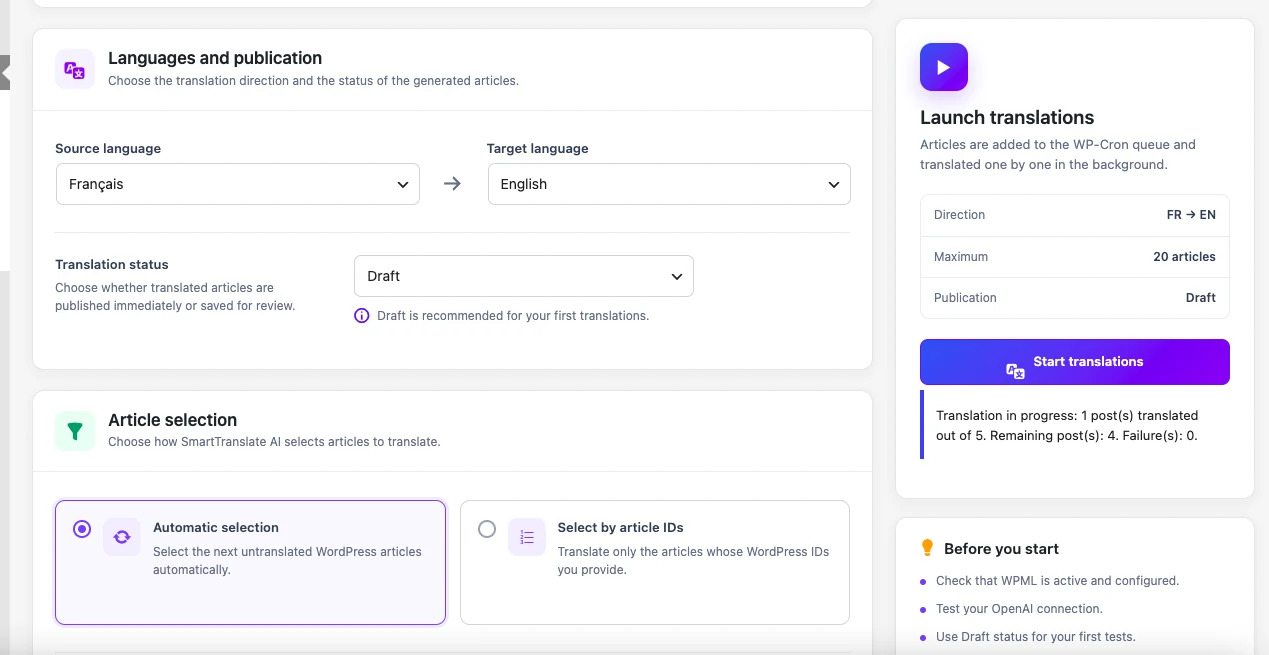
Plugin screenshot: choose languages, keep Draft selected and translate your posts.
From content to translation in four steps
Activate WPML and configure your own OpenAI API key.
Choose the articles and target languages.
Start with one post as a draft, then translate larger batches.
Open the translated post from History, review it, then publish when ready.
A WordPress workflow you can inspect
These plugin screenshots show the controls and history you will use. Open any screenshot to see it at full size.
Translate multiple articles in one workflow
Choose your WPML source and target languages, select the untranslated content you want to process, and let Translation Assistant create the translated versions without leaving WordPress.
- Select multiple articles or enter WordPress IDs
- Create translations as drafts or publish them
- Check for existing or in-progress WPML translations
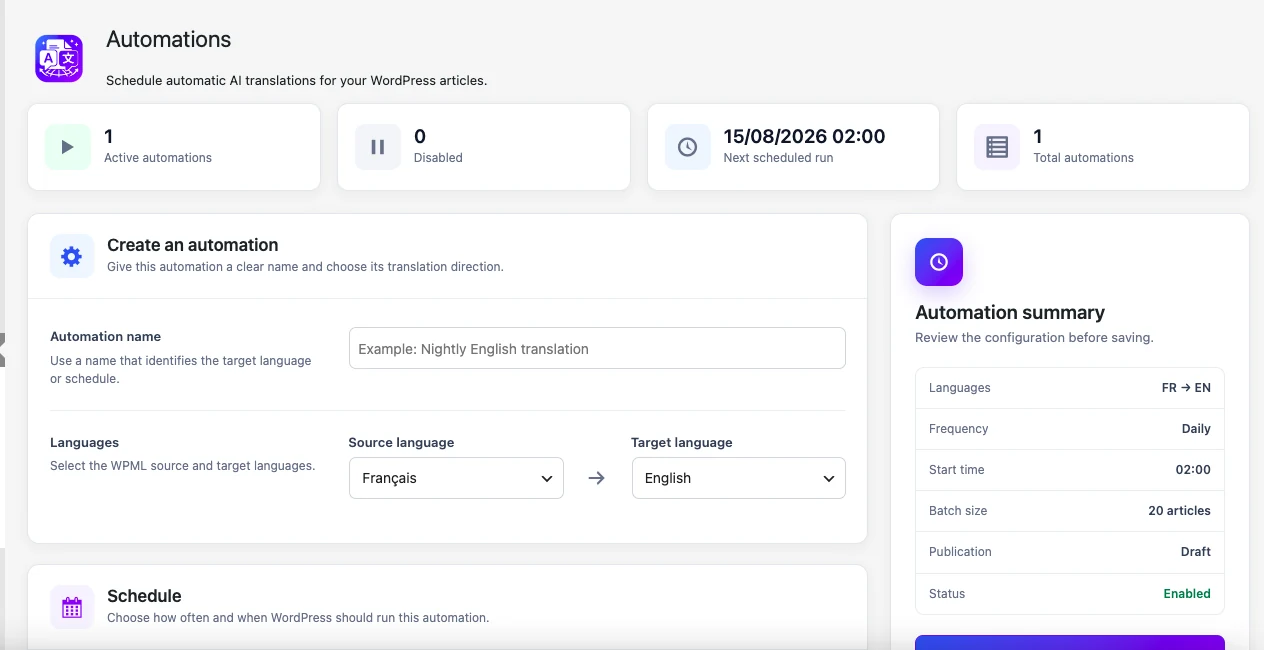
Configure it once. Let translations run automatically.
Publish a new post and let Premium start its translation workflow. You can also schedule recurring runs to find untranslated posts, without manually launching each batch.
- Choose source and target languages
- Schedule recurring translation runs
- Control batch size and publication status
- Start translations automatically when a new post is published
- Keep translations as drafts for editorial review
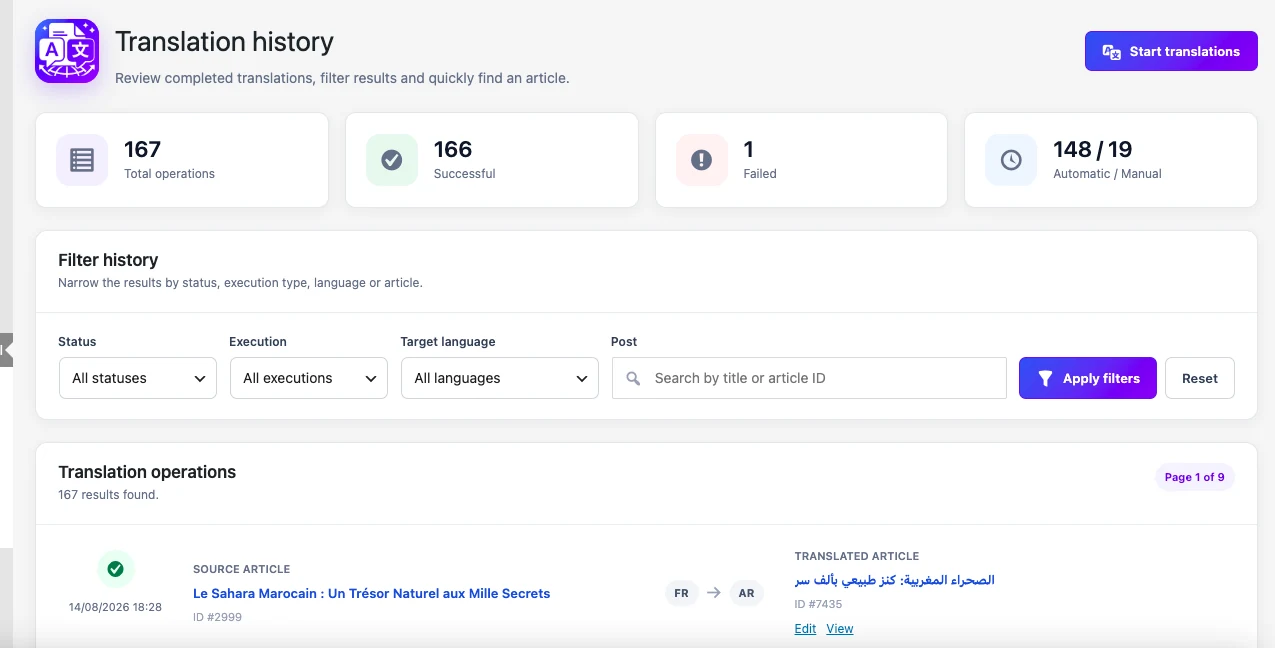
Keep track of every translation
Review completed operations, failures, target languages and translated content directly from your WordPress dashboard.
- Success and failure statistics
- Filter by status, execution type or language
- Open translated content directly
Translate the post and its supported SEO metadata
When supported fields are present, Translation Assistant can translate Yoast SEO and Rank Math titles and meta descriptions alongside your post. Review those fields before publishing.
See your API usage
The dashboard shows input and output tokens and an estimated OpenAI API cost. The estimate helps you inspect usage; your OpenAI account remains the source of your actual charges.
See everything included in Free →Free translates. Premium automates.
The Free edition includes on-demand bulk translation. Premium adds translation on publication and recurring schedules.
| Feature | Free | Premium |
|---|---|---|
| WPML integration | ✓ | ✓ |
| Your own OpenAI API key | ✓ | ✓ |
| Bulk translation | ✓ | ✓ |
| Draft or published translations | ✓ | ✓ |
| Translation history | ✓ | ✓ |
| Translation triggered when a new post is published | — | ✓ |
| Scheduled translations | — | ✓ |
| Supported Yoast SEO & Rank Math metadata | ✓ | ✓ |
| Token usage & estimated API cost | ✓ | ✓ |
Choose the license that fits your websites
All Premium licenses include the same automation features. You only choose how many WordPress sites you want to activate.
Free
For manual, on-demand translation.
- On-demand bulk translation
- Your own OpenAI API key
- WPML language association
- Draft or published translations
- Full translation history
1 Site
For one multilingual WordPress website.
- Everything in Free
- Scheduled translation automations
- Configurable automation batch sizes
- Translation triggered on publication
- Choose languages and draft or published status
5 Sites
For freelancers, small agencies or several websites.
- Everything in Free
- Scheduled translation automations
- Configurable automation batch sizes
- Translation triggered on publication
- Choose languages and draft or published status
25 Sites
For agencies and larger portfolios.
- Everything in Free
- Scheduled translation automations
- Configurable automation batch sizes
- Translation triggered on publication
- Choose languages and draft or published status
Premium is available for 1, 5 or 25 sites with monthly or annual billing. Annual billing saves about 17% compared with paying monthly. No lifetime license is currently offered. OpenAI API usage is billed separately by OpenAI.
Before you get started
Does this replace WPML or translate my entire site?
No. It works with WPML Multilingual CMS and focuses on WordPress posts and supported SEO metadata. Do not assume support for menus, WooCommerce products or every custom field.
Do I need WPML?
Yes. Translation Assistant is designed to work with WPML and requires WPML Multilingual CMS to be installed and active.
Do I need ChatGPT Plus?
No. This plugin uses the OpenAI API, which is separate from a ChatGPT subscription. You need API access and your own key; API usage may incur charges.
Do I need my own OpenAI API key?
Yes. You connect your own OpenAI API key in WordPress. OpenAI API usage is billed separately by OpenAI.
Can I translate multiple articles with the Free edition?
Yes. The Free edition supports on-demand bulk translation. Premium is focused on automation rather than unlocking bulk selection.
What does Premium add?
Premium is a separate add-on for translation triggered on publication and scheduled translation automations. Install the free plugin first and activate an authorized Premium license. WordPress scheduled tasks must run for automations to work. Bulk translation and full history remain available in Free.
How much does Premium cost?
Premium costs $4.99/month or $49.99/year for 1 site, $9.99/month or $99.99/year for 5 sites, and $19.99/month or $199.99/year for 25 sites. There is currently no lifetime license.
What happens if a translation already exists?
Translation Assistant checks WPML before creating a translation and can stop the operation when a translation already exists or is already being processed.
Start with one article. Keep control of the result.
Install the free plugin from WordPress.org and try one article as a draft. Add Premium later for translation on publication or recurring schedules.