How to bulk translate WordPress posts with WPML and OpenAI
Already use WPML and want to translate a batch of blog posts with your own OpenAI API key? This guide walks through the free Translation Assistant workflow, starting with a draft you can review.
Why start with one post?
A small first check lets you inspect the translated content, formatting and language association before processing a larger batch. AI output should be reviewed, especially when the original contains specialized terms, links, shortcodes or complex layouts.
1. Install the free plugin and connect your account
In WordPress, open Plugins → Add New Plugin and search for Translation Assistant with OpenAI and WPML by samsam80. Install and activate it, then enter your own OpenAI API key in the Translation screen. The installation instructions explain the setup.
You do not need ChatGPT Plus. The OpenAI API is a separate service. Your OpenAI account controls API access, charges and limits.
2. Choose languages and keep Draft selected
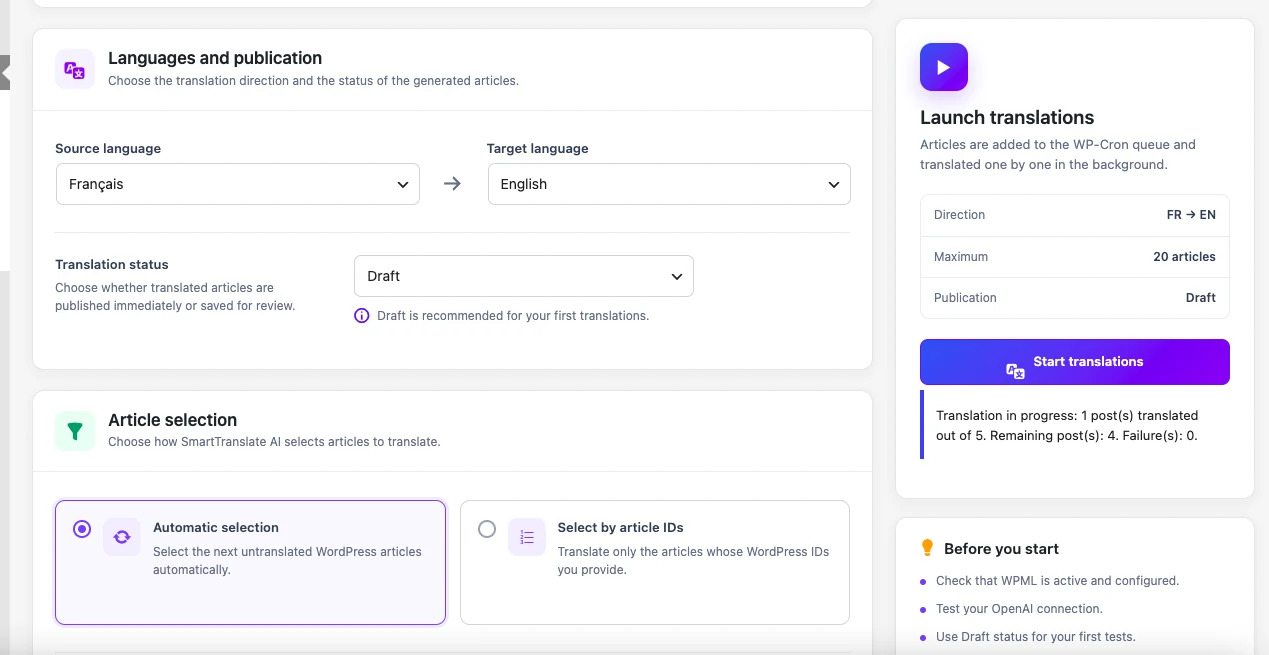
Select a source language matching the original post and a different target language configured in WPML. Choose Draft so you can review the result before publication. Use Select by article IDs to test a specific post; its ID appears after post= in the WordPress edit URL.
3. Launch the first translation and inspect it
Use a batch size of one for your first check. Click Start translations only when you are ready to use the API. The plugin adds the work to the local WordPress queue; scheduled tasks must be able to run. Open History to inspect the completed operation and access the translated post.
Check the title, content, links and layout. When supported fields exist, review the translated Yoast SEO or Rank Math title and meta description as well. The plugin links the translated post to its source through WPML.
4. Process a larger batch
Once the first result fits your workflow, select more untranslated articles or use automatic selection to find the next eligible posts. Set the batch size and keep Draft if you want editorial review. Bulk translation is included in the free plugin; Premium is not required for it.
The dashboard displays input/output tokens and an estimated API cost. Compare the estimate with your OpenAI account before expanding usage. No fixed cost per article is promised: content length and the selected model affect usage.
What if a translation already exists?
The plugin checks WPML translation state before processing. Existing translations or work already being handled by WPML can block another translation for the same target language. Check the recorded message before changing or removing an existing translation.
When is Premium useful?
Premium is a separate add-on for translation triggered when a new post is published and for recurring schedules that find untranslated posts. It requires the free plugin, an authorized license and working WordPress scheduled tasks. Compare Premium when you need publication-triggered or scheduled translation; manual batches remain free.